Where this comes from
Searchive exists because a historian in our household had this problem: thousands of scanned pages, with journals and registers and correspondence in four languages and no way to ask any of it a question. Finding a name meant reading. The cloud services that could have read the scans wanted the whole archive uploaded first. A century of papers on someone else's server felt wrong to us, so the programmer at the same table built the tool. What follows is what we learned along the way.
What old print does to OCR
OCR engines are trained on clean modern type. Historical print departs from that in predictable ways. It helps to know which of them matter.
- Letterpress from a tired plate has broken thin strokes and ink pooling in the counters of e and a. Recognition degrades gradually: most words survive and some become near-misses.
- Text from the reverse showing through thin paper and brown spotting can make the engine read ghost letters. The confidence score for each page shows where.
- Old orthography such as "Thür", "seyn", Dutch "zoo" and "visch" or French "avoit" is read as printed. These are not errors, so your search has to allow for them, which is what any-word mode is for.
- Diacritics and ligatures (ä ö ü ß, é è ç, ij) get read as something else by a model that has never seen them. Choosing the right language for each document fixes most of this.
- Fraktur, the German blackletter that was standard in print until the 1940s, needs its own model. Searchive doesn't include one yet. Our German page on Fraktur covers what works.
- Handwriting is a different technology. Parish registers before the late nineteenth century, letters, diaries and marginalia need handwritten text recognition. Transkribus does that, as a cloud service.
In practice this means printed and typed material from roughly the 1850s onwards, in Antiqua typefaces and in German, French, English, Dutch or Italian, is what a Tesseract-based tool such as Searchive reads well enough to search by. That covers much of what genealogists and local historians have as PDFs: printed registers, yearbooks, newspapers, journals, address books, typed transcriptions and committee minutes.
Language per document
A library of historical sources is usually multilingual. A Dutch family has German cousins and a French letter turns up in an English file. Reading everything with one language setting is the most common reason old-print OCR disappoints. In Searchive you choose the language when you import a document. A document can have two: a German journal with French quotations is read as deu+fra. Documents that already carry a text layer, such as PDFs from an archive's own digitization, are indexed without recognition.
Searching a name in all its spellings
Clerks spelled names by ear. One man is Meijer, Meyer and Meier in three documents and one city is Cöln, Köln and Coeln. Searching each spelling separately is the chore that makes people give up, so there are three search modes.
- Any word: type every spelling you know and a page matches if it contains any one of them. Use it for names and places.
- All words: every term must be on the page, for example a name plus a place or a name plus a year.
- Exact phrase: the words in that order, such as "zoon van", "geboren te" or "fils de".
Accents and apostrophes work as you type them, so l'église finds l'église and Sa'ud finds Sa'ud with straight or curly quotes. Tests cover this behavior because free desktop indexers tend to fail on exactly these characters.
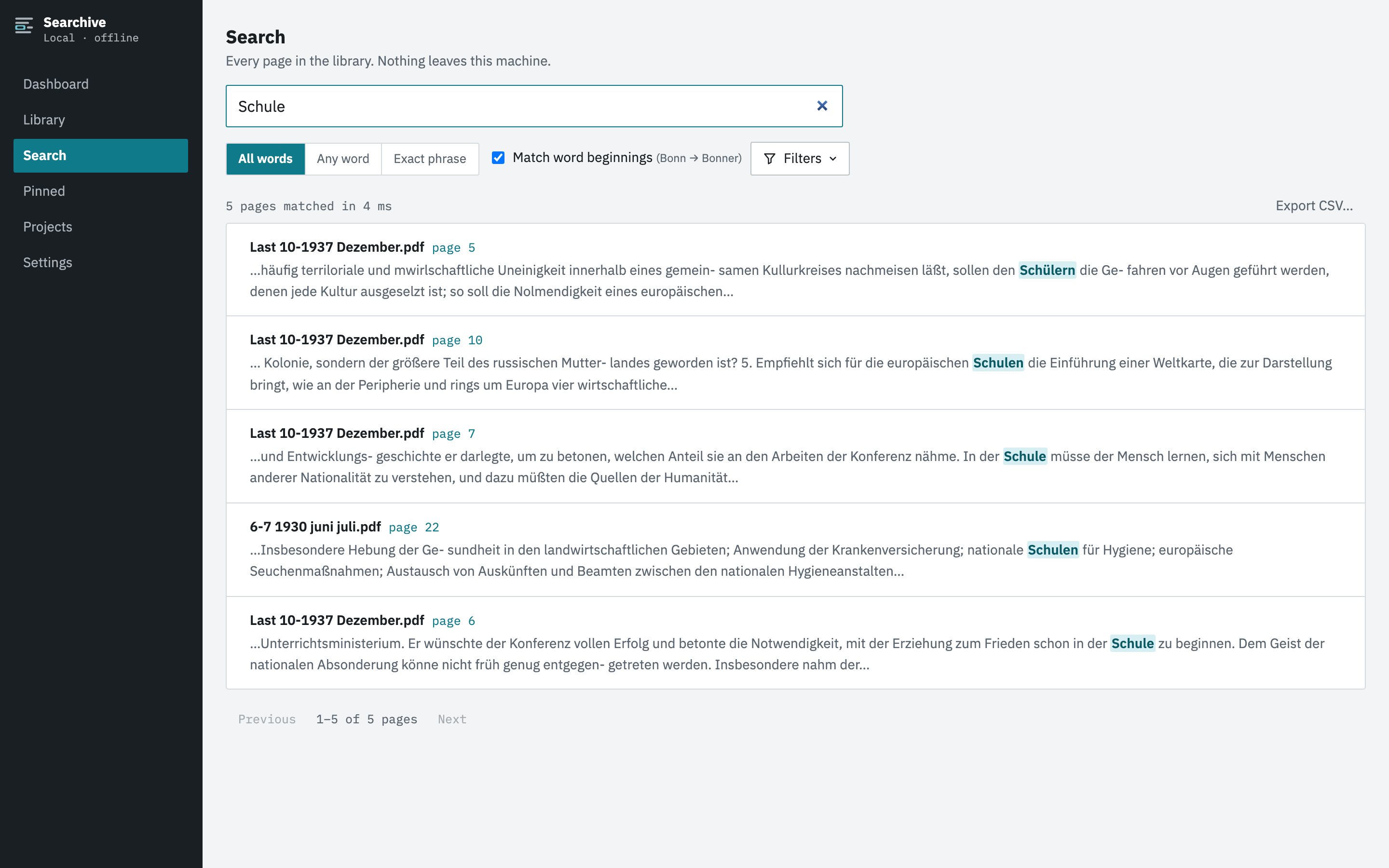
Searchive is a desktop application for macOS and Windows that runs OCR on whole folders of scanned PDFs and photographed documents and then searches every page, with the match highlighted on the scan. Everything stays on your machine. It's free for one document and needs no account.
Join the waitlistReading the original
A search result that says "page 214 of yearbook 1911" is half the job. The other half is seeing the entry: the printed line, the column it sits in, the footnote and the handwritten correction in the margin that OCR could never read but you can. Searchive opens the scanned page with the match highlighted on the image. Text is selectable where a text layer exists, but what you look at is the source.
Keeping what you find
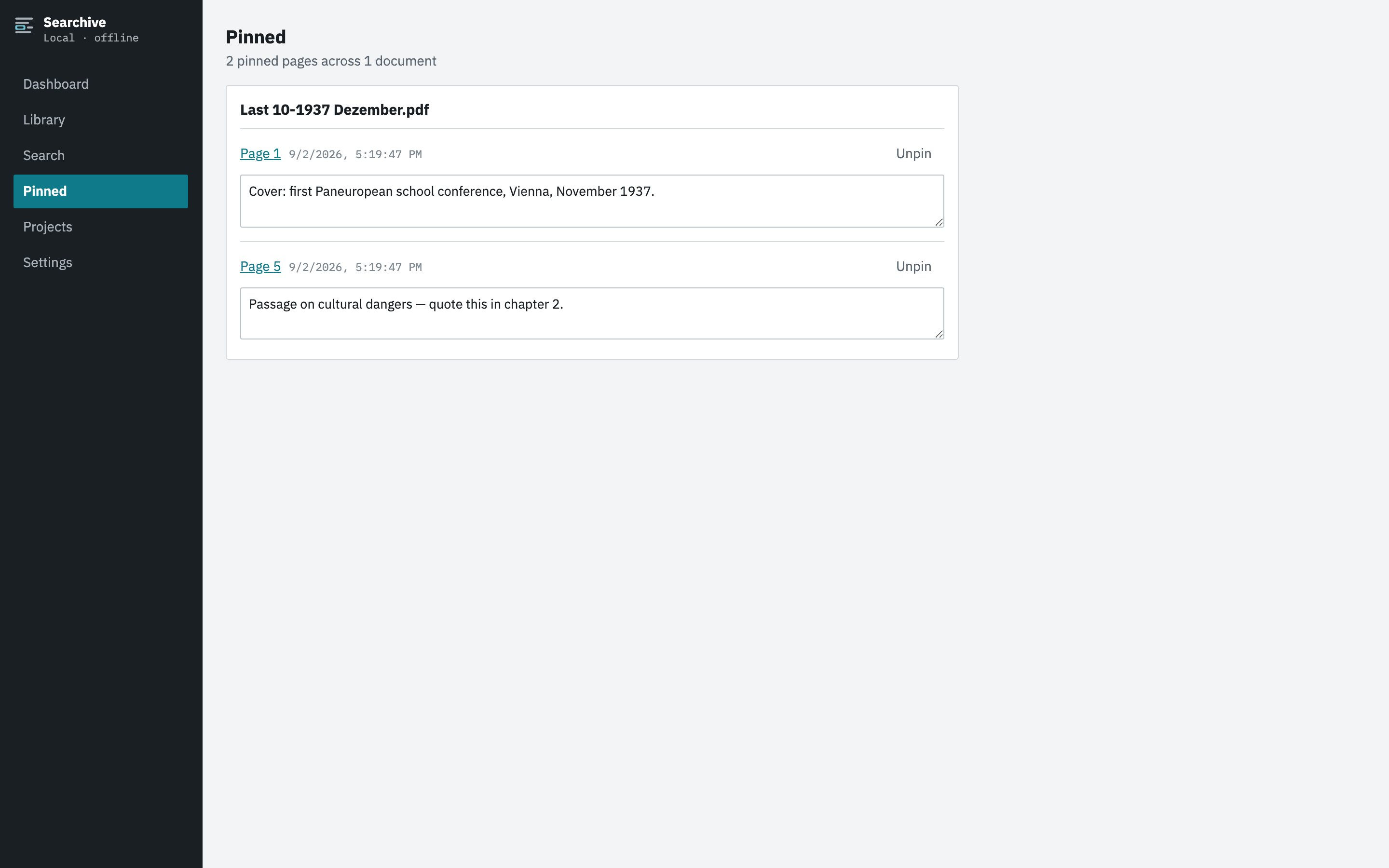
The research doesn't end at the search. In Searchive you can pin a page with a note in your own words ("witness at the 1887 marriage is the brother-in-law from Deventer"). The Pinned screen collects every finding by document and opens the page with one click. Any search can be exported as a CSV with file, page and snippet for your source list. Projects group documents by family line, archive or question without moving any files.
Knowing which pages to double-check
Old scans are uneven. Some pages read perfectly and some are a faint mess. A search that silently skips the faint ones is worse than no search. Every page in Searchive records its recognition confidence on Tesseract's own 0–100 scale. Pages below a threshold you set are listed for review. A page that yields no text at all is retried in a second segmentation mode before it is allowed to count as blank, because in testing the failure we met most often was a skewed page that read as empty.
Photographs from the reading room
Much of a genealogist's raw material is photographed rather than scanned. Searchive imports a set of photos as one document with the pages in camera order, so the 40 photos of a printed register become one searchable source. Shoot flat and straight down, fill the frame and use JPEG rather than HEIC. Recognition then treats the photos like scans. We wrote a separate guide on photographing documents for OCR.
Where the archive stays
On your own computer in one folder: originals, searchable copies, index and notes. Nothing is uploaded, no account is needed and there are no analytics. It works in the archive basement with no signal. The demo video on the landing page shows the app on a set of 1930s journals. You pay once so nothing lapses. After the 14-day trial the free plan keeps one document fully working and the rest of the library stays readable, searchable and exportable.
Frequently asked questions
How well does OCR read nineteenth-century print?
Printed text in modern (Antiqua) typefaces from the mid-nineteenth century on generally reads well enough to search by, even with old spelling and worn type. Quality drops with faint ink, bleed-through and very small type. Fraktur needs a special model that Searchive doesn't include yet. Handwriting is outside what OCR does.
What about handwritten registers and letters?
OCR doesn't read handwriting. For that you need handwritten text recognition, for example Transkribus, a cloud service that charges credits per page. Searchive imports handwritten pages so you can view and pin them but their text isn't searchable.
How do I search a name that is spelled several ways?
In Searchive, switch to any-word mode and type every spelling you know. A page matches if it contains any one of them. Accents and apostrophes are handled as you type them.
Can I search scans in several languages in one library?
Yes. Each document is recognized in its own language (German, French, English, Dutch or Italian) or in two at once. One search runs across all of them.
Will my archive photos work as well as scanner scans?
Usually, if they are sharp, straight and evenly lit. A set of photos is imported as one document in camera order. Perspective distortion and page curl aren't corrected, so shoot flat and straight down.