Why you can't search a scanned PDF
A PDF can hold two very different things. One exported from Word contains the text itself, every letter stored as a character the computer knows. One that came from a scanner or a phone holds a picture of each page and nothing else. You can read the letters but the computer only has pixels, so search, copy and select-all behave as if the page were blank.
You can tell which kind you have in a few seconds. Open the file and drag the mouse across a sentence. If single words highlight, there is a text layer. If a rectangle appears over the page, as when you crop a photo, it is a scan.
What OCR does to a PDF
OCR (optical character recognition) looks at the image of a page, works out where the lines and letters are and produces the text it thinks is printed there. A good tool writes that text back into the PDF as an invisible layer sitting exactly over the printed words. The page looks the same as before. Underneath, every word now has a position, so search can find it, highlight it and let you copy it.
Two things follow from this. OCR is a best guess and how good it is depends on the scan: a sharp 300 dpi scan of twentieth-century print reads almost perfectly while a faded photocopy at 150 dpi does not. The language matters too. A model trained on English has never seen ß or ç and will read them as something else, so telling the tool which language the document is in fixes a lot straight away.
Free ways to OCR a scanned PDF
OCRmyPDF and Tesseract on the command line
OCRmyPDF is free and open source. It drives Google's Tesseract engine and gives you the same page images with a searchable text layer added, all on your own computer.
ocrmypdf --language deu --deskew --rotate-pages scan.pdf searchable.pdfSwap deu for eng, fra, ita or nld. For a document in two languages join two codes with a plus sign (deu+fra). On macOS you install it with Homebrew (brew install ocrmypdf). On Windows it takes pip and a separate Tesseract install, with WSL as the alternative. Everything is typed by hand: each file, each folder, each language. Ten PDFs is fine. Two thousand becomes a scripting project. Even then nothing lets you search the result.
Adobe Acrobat
Acrobat Pro has a Scan & OCR tool that recognizes text in the open document and can run over a folder as a batch action. Recognition is good on clean print, but the work is still per file: open, recognize, save. Acrobat's advanced search can look through many files. On scans it is slow and it gives you a list of hits without the page image. Acrobat Pro is a subscription. The free Reader cannot do OCR.
Google Drive and other cloud services
Upload the PDF to Google Drive, right-click, choose Open with Google Docs and Drive recognizes the text. It costs nothing and needs no software, but the document now sits on a server you don't control, under terms you didn't write. For a scanned magazine that hardly matters. For client files, medical records, personnel files or your grandmother's letters it is a decision to make on purpose. We wrote a separate guide on OCR without uploading anything.
Built into the operating system
Recent versions of macOS recognize text in images and in PDF pages opened in Preview (Live Text). You can select and copy it. It doesn't write a text layer into the file and Finder search doesn't find the words. Windows has no built-in PDF OCR. Both are fine for lifting a paragraph out of a scan and no use for making an archive searchable.
What goes wrong and how to spot it
- The wrong language is the most common cause of bad results. A Dutch document read with an English model loses every ij and every accent.
- Below 300 dpi the letters lose the detail the engine needs. Rescan if you can. If you can't, expect mistakes in small print.
- Pages laid crooked on the glass or fed in sideways. Most tools straighten the page and fix 90-degree turns, but upside-down pages still trip up Tesseract-based tools, ours included.
- Worn or faded print in old newspapers, carbon copies and weak photocopies. The engine reads what it can and the rest turns into noise.
- Handwriting is outside what OCR does. See the FAQ below.
A tool that shows a confidence score for each page saves you from finding these problems one missed search at a time. Tesseract produces the score but few programs show it.
Searchive is the desktop app we built for people whose real goal is finding things in their scans. Import a folder, pick the language per document and every page becomes searchable, with matches highlighted on the scan itself. It runs on your own Mac or Windows PC, it's free for one document and it needs no account.
Join the waitlistWhen you have a thousand files
Everything above answers "how do I make this PDF searchable?". Most people are asking something else: where in these boxes is the page that mentions a particular name? Answering that takes three things a single-file tool doesn't give you.
- OCR that runs by itself across hundreds of files, each in its own language, with a status per document and a restart from page 124 when page 124 of 350 fails.
- One search box that covers every document and returns ranked results with a snippet, instead of opening each file and pressing Ctrl+F.
- The match shown on the scan. A list of file names is not a result. The page image with the word highlighted is, since the original page is what you will cite.
Searchive is built for this. You import PDFs (or a set of phone photos, which becomes one document) and say which of German, French, English, Dutch or Italian each one is in. The app then recognizes and indexes every page on your machine. PDFs that already have a text layer are indexed without OCR. Search has three modes: all words, any word (so Cöln, Köln and Coeln find the same page) and exact phrase. Each page keeps its confidence score, so you can see which ones deserve a second look.
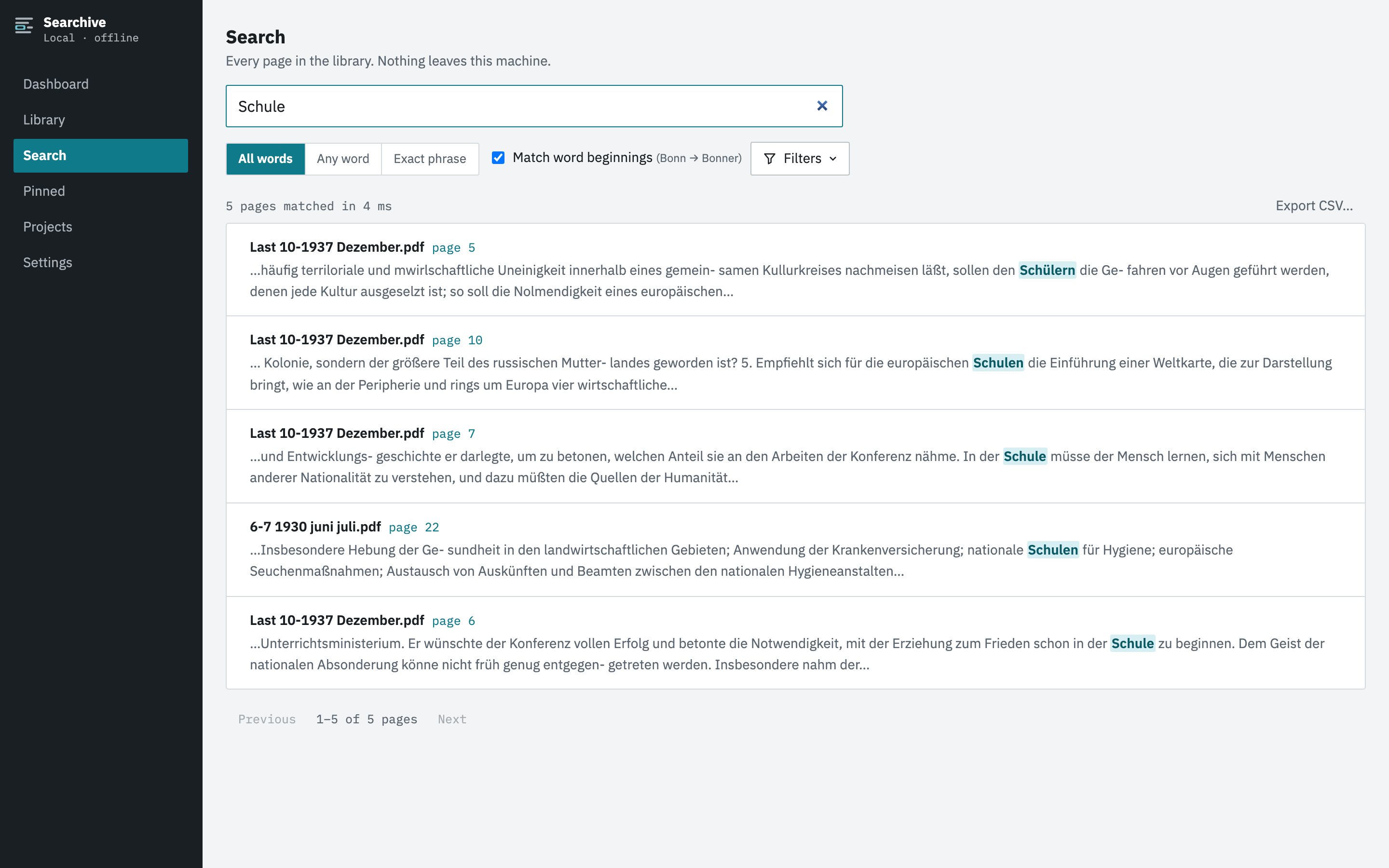
The originals, the searchable copies and the index all stay on your computer. Nothing is uploaded. The demo video on the landing page shows the app on a set of 1930s journals.
Frequently asked questions
How do I know whether my PDF is scanned or has real text?
Try selecting a word with the mouse. If the cursor selects text, there is a text layer. If it draws a box over the page as if it were a photo, the PDF is an image and needs OCR before you can search it.
Does OCR change my original PDF?
That depends on the tool. Some overwrite the file and most write a new one. Searchive never changes the file you import. It keeps a separate searchable copy next to the untouched original.
Can I OCR a scanned PDF for free?
Yes. OCRmyPDF with Tesseract is free, open source and runs on your own computer from the command line. Google Drive OCRs an uploaded PDF for free if you're fine with uploading it. Acrobat Pro can do it too but is paid.
Why does my OCRed PDF still miss words?
Usually the wrong language was chosen, the scan was below 300 dpi, the page was skewed or rotated or the print is worn. Run OCR again with the right language and check the pages the tool flags as low confidence.
Does OCR work on handwriting?
Not with the tools in this guide. Tesseract and Acrobat's OCR are built for printed text. Handwriting needs handwritten text recognition, for example Transkribus. Searchive doesn't read handwriting.