What Acrobat's OCR is for
Acrobat's text recognition is a tool inside a PDF editor. You open a scanned document and run Scan & OCR. The file gains a text layer that you can search, copy from or convert to editable text. Adobe's plan comparison lists this under Acrobat Pro ("turn scanned documents into editable, searchable PDFs"), which is a subscription for Mac and Windows. Recognition is a feature of the desktop application. Adobe's pages don't say whether the cloud is involved, so check the current documentation if that matters to you.
Acrobat Pro can also run recognition on several files at once through its Action Wizard, which Adobe lists as Pro-only. A folder of scans can then be processed without opening each file. Afterwards the files are searchable PDFs that any viewer can search, one at a time.
This suits work where the document is the unit: a contract to sign, a report to edit, a scan to send on. Acrobat is built around editing and its OCR serves that.
What Searchive is for
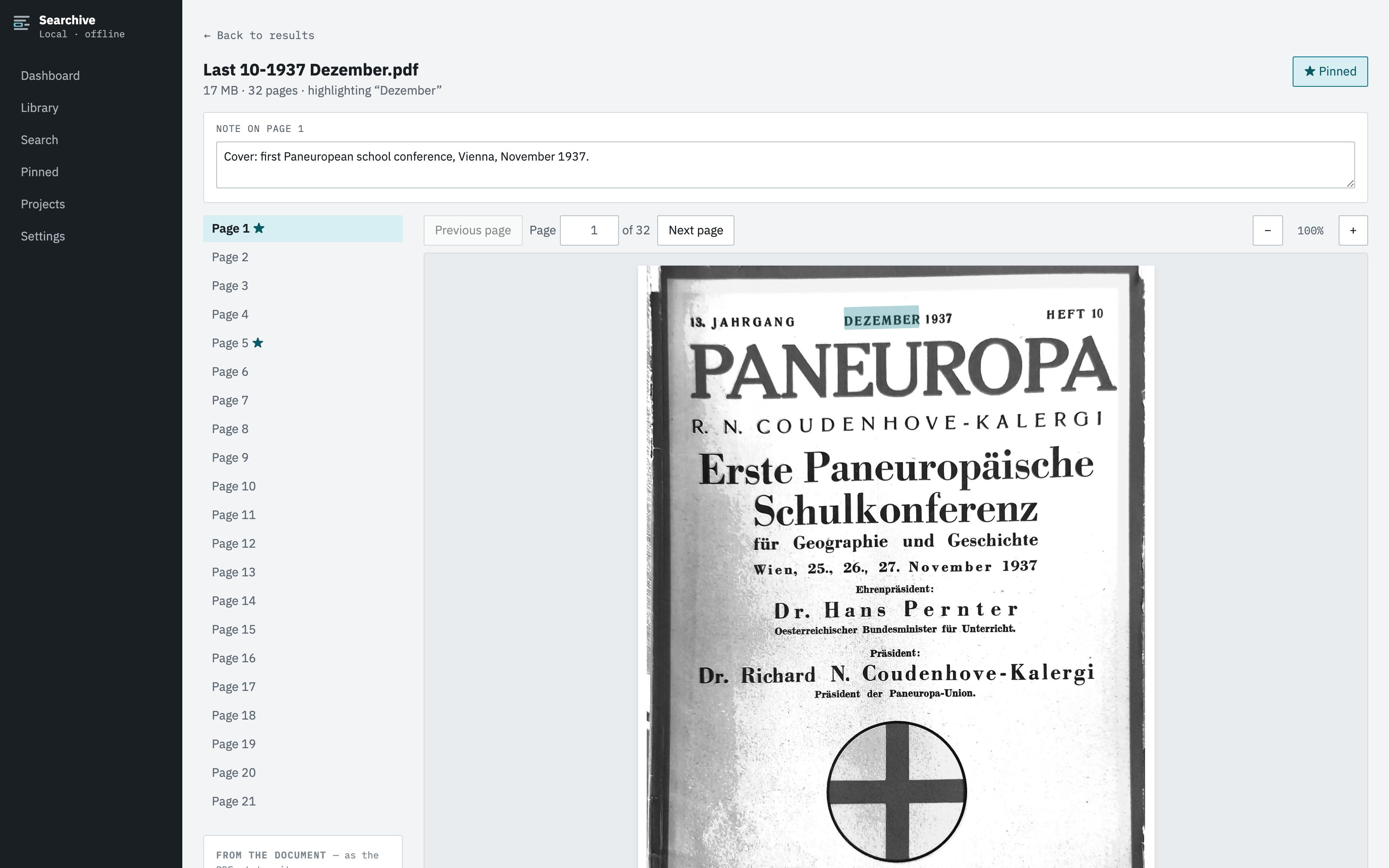
Searchive is built around the library. You don't open a document and run OCR. You import a folder and the app recognizes every document that needs it, in the language you chose for each, in the background. You then search once across everything. A click on a result opens the scanned page with the match highlighted. You can pin the page, add a note and export the list of results. Nothing is edited and nothing leaves your machine.
It is meant for people with thousands of pages who keep asking which of them mention a certain name. If your question is "find every page in these boxes that mentions this name" it fits. If your question is "fix this PDF" it doesn't.
Side by side
| Feature | Searchive | Acrobat |
|---|---|---|
| Unit of work | A library of documents | One document |
| OCR on import | Automatic for every document that needs it, with a language per document | Per file or as a batch action in Pro |
| Search across all files | One box, every page, ranked, with snippets | Advanced Search over a folder, slow on scans, gives a list of hits |
| Result shown on the scan | Page image with the match highlighted | Opens the file at the page |
| Spelling variants | Any-word mode: Cöln Köln Coeln in one search | One term at a time |
| Confidence per page | Recorded and listed for review | Not shown |
| Photos as a document | A set of photos becomes one document | Combine images into a PDF, then OCR |
| Editing, forms, signing | No | Yes, it is built for that |
| Works offline | Fully, no account needed | The desktop app works locally but the subscription needs an Adobe account |
| Platforms | macOS (Apple Silicon), Windows | macOS, Windows, web, mobile |
| Price | Free for one document. Unlimited: €10 once at launch, €39 after | Monthly subscription, current prices on adobe.com |
| If you stop paying | Nothing to renew, you paid once | Editing and OCR stop. Your files stay yours |
When Acrobat is the better choice
- You need to edit the scanned document: fix text, add pages, redact, fill in a form or sign.
- You want editable text out of the scan to paste into Word rather than a searchable image.
- You have a handful of documents and already pay for Acrobat, so running its OCR costs nothing extra.
- Your documents are in a language Searchive doesn't read yet. Searchive reads German, French, English, Dutch and Italian. Acrobat supports many more.
When Searchive is the better choice
- You have hundreds or thousands of scans and the question is always where something is mentioned rather than how to change it.
- You want the page image with the hit highlighted because you cite originals.
- Names and places are spelled several ways and you want one search to catch all of them.
- You need to know which pages to double-check. Every page's confidence score is recorded. The weak ones are listed.
- Photos are your raw material as often as scans are.
- You would rather pay once than every month for a tool whose price doesn't grow with the archive.
Try it on one document. The free version is the full product on a single document, however many pages it has. It needs no account or card and never expires. Unlimited documents cost €10 once at launch and €39 after.
Join the waitlistUsing both
The tools don't compete for the same job, so plenty of people will use both: Acrobat to prepare and edit individual documents and Searchive to search the archive. A PDF that Acrobat has already OCRed is imported without recognition running again, because Searchive detects the text layer and uses it as it is. A PDF that Searchive has made searchable is an ordinary PDF that Acrobat opens like any other.
Frequently asked questions
Can I use PDFs that Acrobat already OCRed in Searchive?
Yes. A PDF with a usable text layer is indexed directly without running OCR again, whoever made it. Acrobat's searchable image output works as it is.
Does Searchive edit PDFs like Acrobat?
No. Searchive doesn't edit, annotate, redact, sign, merge or convert PDFs. It reads scans, indexes them and searches them. If you need to edit a document you still need an editor.
Is Searchive's OCR better than Acrobat's?
We haven't measured Acrobat against our pipeline and won't claim a number we didn't measure. Both read clean print well. Searchive lets you choose the language per document and records a confidence score for every page, so you can see where recognition struggled.
Do I need Acrobat at all if I have Searchive?
For searching scans, no. For editing, filling in forms, signing or preparing PDFs for print you need Acrobat or another PDF editor. Many people will use both.